
Norton AntiVirus Plus: what is actually in the package, and how to judge it
Disclosure — read this first. This article is published by DELTA BARS s.r.o. and is funded by advertising. The buttons marked “Partner link” are paid affiliate links to Norton. If you subscribe after following one, we are paid a commission by the advertiser; your price is unchanged. We are not Norton, we are not affiliated with or endorsed by Gen Digital Inc., and we cannot sell you a licence, change your subscription or provide support.
No advertiser has approved, reviewed or paid for the wording of this page. Where our description and Norton's own published information differ, Norton's information prevails — always confirm features, device counts and prices on the vendor's own site before paying.
A plain-language guide to what an entry-level security suite does, what the marketing language actually means, and the handful of things worth checking on the vendor's page before you subscribe.
Security software is sold in a vocabulary that has drifted a long way from what the software does. “Advanced AI protection”, “multi-layered defence”, “zero-day shield” — these phrases appear on every vendor's page and tell you almost nothing that helps you choose. This article tries to do the opposite: describe the mechanics in ordinary words, be explicit about where the limits are, and point you at the three or four facts that actually differ between products.
All the diagrams on this page are original SVG files drawn by us. There are no product screenshots and no stock photography anywhere on this site.
What “Norton AntiVirus Plus” refers to
Norton is a consumer security brand. The first product to carry the name, Norton AntiVirus, was released by Symantec in 1991, which makes the brand one of the oldest still trading in this market. The corporate owner has changed more than once: Symantec's consumer business became NortonLifeLock in 2019, and NortonLifeLock was renamed Gen Digital Inc. in 2022 after merging with Avast. That history is why you will see the name attached to very different products across three decades.
“Norton AntiVirus Plus” is the name of the entry-level tier in Norton's current consumer range, sitting below the Norton 360 tiers. This distinction matters more than it sounds, because the tiers differ in two ways that change the price you pay:
- How many devices the licence covers. The AntiVirus Plus tier has historically been sold as a single-device licence — one PC or one Mac — while the Norton 360 tiers cover larger numbers. If you need to protect a household of several machines, the entry tier is usually not the one you want. Confirm the current figure at checkout; it is stated there.
- Which components are included. Features such as VPN, dark-web monitoring, parental controls and larger cloud-backup allowances belong to the higher tiers. Feature lists are revised regularly, so a comparison written even a year ago may be wrong.
Why we keep saying “check the vendor's page”. Antivirus tiers, bundled components, device counts and prices are changed by vendors without notice and differ by country. Any article that quotes them as fixed facts will be wrong within months. We would rather tell you where to look than give you a number that expires.
Partner link. We earn a commission if you subscribe through it — at no additional cost to you. It opens Norton's own site, where the current feature list, device count and price for your country are shown.
What Norton lists in the package
The table below summarises the components Norton has listed for the AntiVirus Plus tier on its own product pages. We have deliberately described what each component does rather than repeating marketing adjectives, and we have flagged where a component is platform-specific. Treat the right-hand column as the instruction, not as a formality.
| Component | What it actually does | Confirm on Norton's page |
|---|---|---|
| Real-time threat protection | Scans files as they are downloaded, written, opened or executed, and blocks ones it judges malicious. | Included on all tiers |
| Smart Firewall | Monitors connections into and out of the machine and blocks unauthorised ones. Norton describes this as a Windows feature; macOS protection is structured differently. | Check the platform footnote |
| Password Manager | Stores and fills login credentials in a vault protected by one master password. | Check it is in your tier |
| Cloud Backup | An allowance of online storage for files, which is relevant mainly as a ransomware fallback. Norton lists this for PC only, and the allowance differs by tier. | Check the allowance in GB |
| Virus Protection Promise | A commitment that Norton experts will help remove a virus from a protected device, or refund, subject to published terms and eligibility. | Read the terms — they are conditional |
We are not going to tell you this list is better or worse than a competitor's. Component lists across the mainstream suites have converged to the point where they are a poor way to choose, and comparisons written by advertising-funded sites — including this one — are the least reliable place to settle that question. The independent laboratories described further down are a better one.
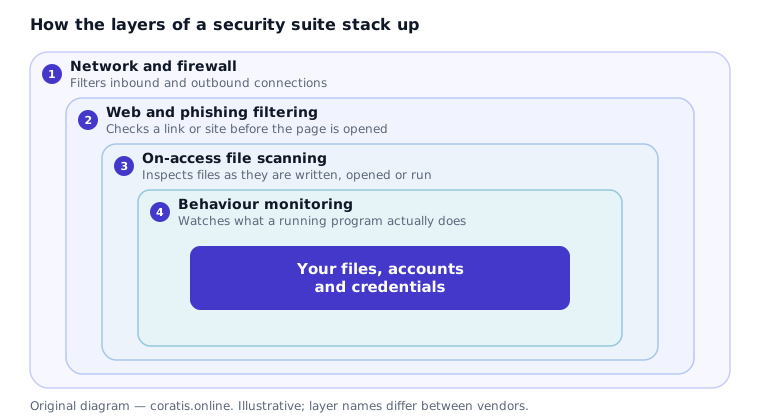
How the detection actually works
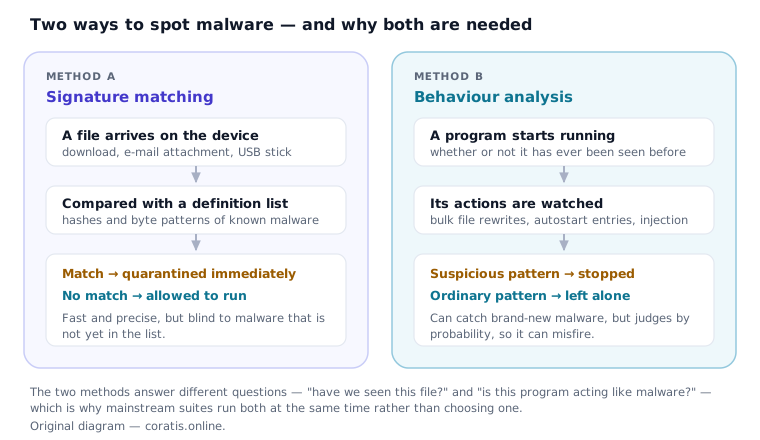
Every mainstream antivirus product uses two fundamentally different techniques at the same time, and almost all the confusion about what these products can do comes from not separating them.
Signature matching — “have we seen this exact file before?”
The scanner computes a fingerprint of a file — a hash, or a pattern of bytes characteristic of a malware family — and compares it against a database of known-malicious fingerprints. This is fast, cheap and close to unambiguous: a match is a match. Its weakness is equally absolute. A piece of malware that is not yet in the database is invisible to this method, and attackers routinely alter their files specifically to change the fingerprint.
Behaviour analysis — “is this program acting like malware?”
Instead of asking what a file is, this method watches what a running program does: whether it starts rewriting large numbers of documents, injects code into other processes, adds itself to autostart, or contacts addresses associated with command-and-control traffic. Because it judges behaviour rather than identity, it can catch malware nobody has ever seen. Because it judges by probability, it can also be wrong in both directions — missing something genuinely malicious, or interrupting a legitimate program that happens to behave unusually.
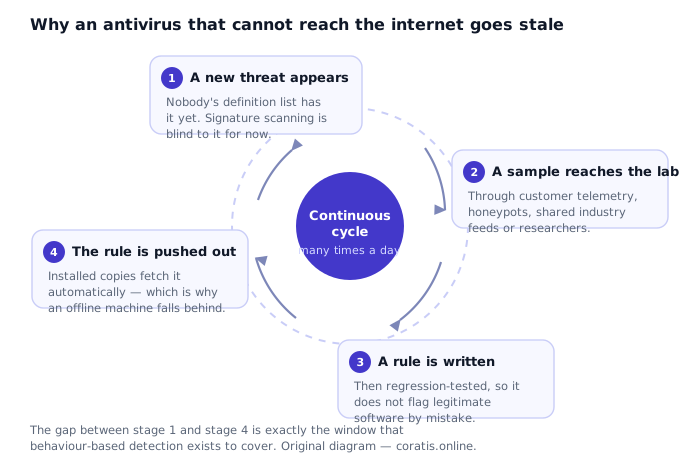
Why it has to phone home
Signature databases are only useful while they are current, and the interval between a new piece of malware appearing and a detection rule reaching your machine is the window in which you are relying entirely on behaviour analysis. That cycle runs continuously, which is why an antivirus product on a machine that has been offline for weeks is substantially weaker than the same product on a connected one — and why “automatic updates” is a feature worth having switched on rather than a marketing bullet.
Partner link — we receive a commission on subscriptions made after following it, at no extra cost to you.
Ransomware: what a suite can and cannot do
Ransomware is the threat most likely to cause a genuinely unrecoverable loss for a household or a one-person business, and it is also the threat about which security marketing is least precise. An attack has distinct stages, and where a product intervenes determines how much you lose.
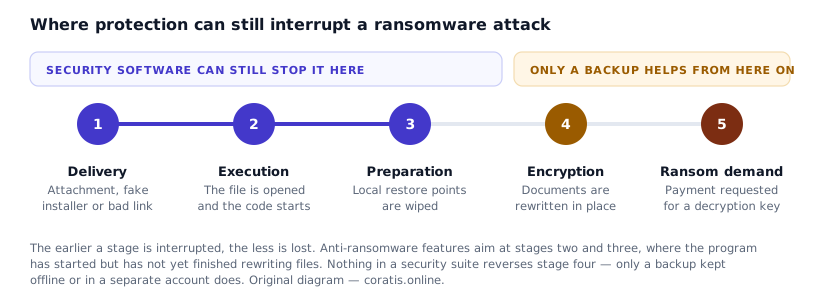
Two things follow from this, and they are worth stating bluntly because vendor copy tends not to:
- No security product guarantees that ransomware will be stopped. A product that detects the great majority of attacks is doing its job well; it is not the same as a guarantee, and any page that implies otherwise is overstating what the software does.
- A backup is the only thing that works after encryption has finished, and only if the backup is somewhere the ransomware could not reach — an external drive that is normally unplugged, or a cloud account the infected machine cannot silently overwrite. A backup drive left permanently connected is encrypted along with everything else.
This is the reason a cloud-backup allowance appears in an antivirus package at all. It is not a convenience feature; it is the recovery path for the case where detection fails.
Phishing and web filtering
Most successful attacks on ordinary people no longer involve breaking software. They involve persuading someone to type a password into a page that looks like their bank, their email provider or their employer's login screen. Web-protection modules address this by checking an address against lists of sites that have been reported and confirmed as malicious.
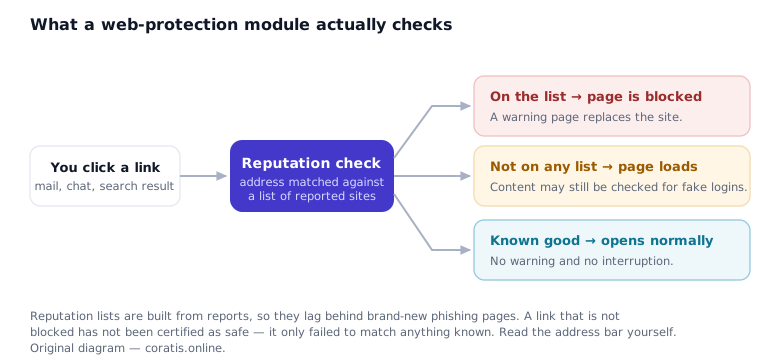
The limitation is structural rather than a flaw in any particular product. Reputation lists are built from reports, and phishing pages are frequently online for only a few hours. A filter will catch the campaigns that have been running long enough to be noticed and will miss the one that went live this morning. Treat it as a useful net with holes in it, not as permission to stop reading address bars.
What lab scores do and do not tell you
The only broadly credible comparative data on antivirus products comes from independent testing laboratories — AV-TEST (Magdeburg, Germany), AV-Comparatives (Innsbruck, Austria) and SE Labs (United Kingdom) are the ones most often cited. They buy or collect current malware, install every product on identical machines, and publish results per round.
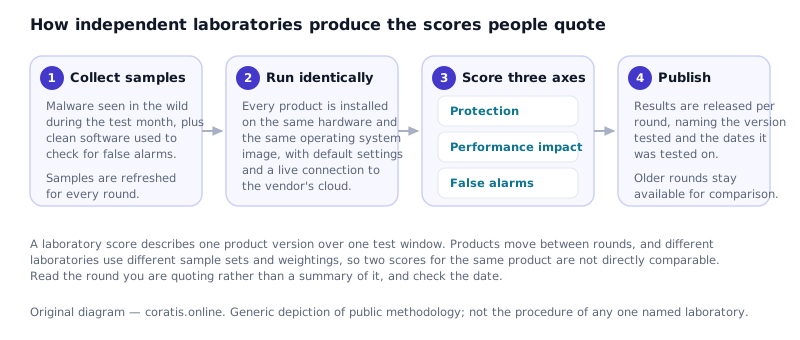
Here is the part that advertising-funded articles usually leave out. A laboratory result describes one product version, in one test round, against one sample set. Products move between rounds. Different laboratories weight protection, performance and false positives differently, so two published scores for the same product are not directly comparable. And in the top group of mainstream products, the differences in protection rate are frequently small enough to fall inside the margin of a single test.
We are therefore not going to assert that any product “consistently ranks at the top”. If you want to know how Norton AntiVirus Plus performed, read the most recent published round from one of the laboratories named above, check the date and the version tested, and draw your own conclusion. That is a better use of ten minutes than any comparison table on a site that earns a commission — including ours.
Performance, honestly
“Lightweight” is claimed by every vendor and measured by the laboratories, which publish a performance-impact score alongside the protection score. The honest summary for mainstream suites on current hardware is this: on a machine with an SSD and a reasonable amount of RAM, the day-to-day impact of real-time scanning is usually not perceptible. On older hardware, or on a machine with a mechanical hard disk, it can be. Full system scans are noticeable on any hardware, which is why they are normally scheduled rather than run on demand.
If performance is your deciding factor, the performance-impact column of a current laboratory round is real measured data and is worth more than any adjective on a product page.
Before you subscribe: six things to check
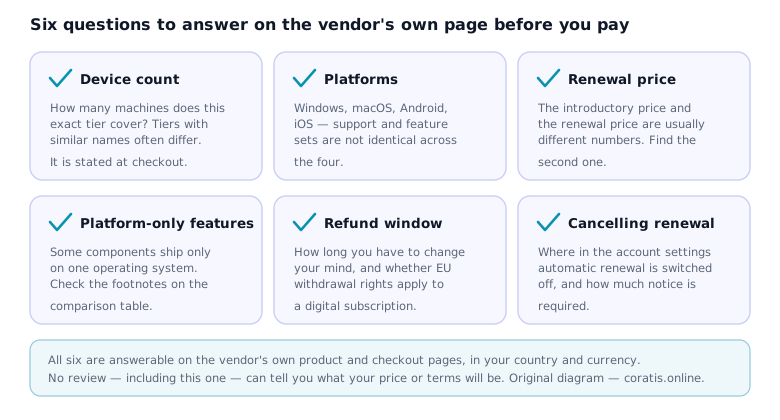
Two of these deserve expanding, because they are where people are most often surprised:
The renewal price. Consumer security software is sold almost universally on an introductory discount, with renewal at a higher standard rate. This is disclosed, but it is disclosed in the terms rather than in the headline. Find the renewal figure before you decide, because it is the number you will actually pay from the second year onward.
Automatic renewal. Subscriptions typically renew automatically by default. Where and how that is switched off, and how much notice is required, is worth locating in the account settings on the day you subscribe rather than eleven months later. In the EU, consumer contracts concluded at a distance also carry statutory rights — including, in defined circumstances, a withdrawal period — and those rights come from your contract with the vendor, not from anything on this page.
Partner link. If you subscribe after following it, the advertiser pays us a commission; your price does not change. Read the renewal and cancellation terms on Norton's own site — they are the binding ones, not this article.
What antivirus software does not solve
A security suite is one control among several. It does not:
- Protect an account whose password has been reused. If the same password protects your email and a forum that was breached three years ago, no software on your laptop helps. Unique passwords and two-factor authentication do.
- Patch your operating system or browser. Unpatched software remains one of the most common ways in. Keeping the system updated is separate work that the suite does not do for you.
- Undo a transfer you authorised yourself. Social-engineering fraud — being talked into making a payment or granting remote access — bypasses the software entirely, because the software sees a legitimate action taken by the legitimate user.
- Replace backups. See the ransomware section above.
- Make you anonymous. That is a different category of product with different trade-offs, and it is not what an antivirus tier does.
Who it suits — and who it does not
A reasonable fit
- One main Windows PC or Mac to protect
- You want one product rather than three separate tools
- You value a support line you can actually telephone
- You are replacing a lapsed or expired product
Probably the wrong tier
- You need to cover several devices — look at the multi-device tiers instead
- You specifically want a bundled VPN or parental controls
- You are on Windows, satisfied with the built-in protection, and disciplined about updates and backups
- You are buying to solve an account-security problem rather than a malware problem
That last point is worth saying plainly: Windows ships with a competent built-in antivirus, and for a careful user it may be sufficient. The case for a paid suite is the additional components, the single point of support, and not having to manage several tools — not the claim that the free option is worthless. It is not.
Corrections to an earlier version of this page
An earlier version of this article, published before the present editorial policy was adopted, contained claims we could not substantiate. They have been removed. In the interest of being checkable, here is what changed:
| Previous claim | Why it was removed |
|---|---|
| “A single subscription can protect several devices.” | Incorrect for this tier. AntiVirus Plus has been sold as a single-device licence; multi-device coverage belongs to the Norton 360 tiers. Replaced with a direction to confirm the count at checkout. |
| “Consistently scores at or near the top of independent evaluations.” | An unverifiable ranking claim. Replaced with an explanation of what laboratory rounds measure and a pointer to read the current round directly. |
| “The difference between a 99% detection rate and a 95% detection rate…” | Both figures were invented for illustration and read as measurements. Removed entirely. |
| “Most users report that after the first week they stop thinking about it.” | There was no survey. Presenting an assumption as a user report is fabrication. Removed. |
| “Tends to outperform alternatives” / “over 20 years of continuous development” applied to this product. | The comparative claim was unsupported. The brand does date to 1991, but the AntiVirus Plus tier is far more recent, so the history has been attributed to the brand and the corporate ownership changes stated. |
| Page framed as a “Reader Story” / “reader-submitted story”. | No reader submitted anything. The framing invented a testimonial that did not exist. The page is now bylined, dated and labelled as what it is: an advertising-funded explainer. |
| “Free trial available.” | Trial availability varies by product, country and promotion, and is not ours to promise. Removed; the vendor's page states what is currently offered. |
Sources
- Norton's own product, feature-comparison and terms pages — the authority on what any tier currently includes, which platforms each component supports, and the price and renewal terms in your country. Where Norton's information differs from anything written here, Norton's information prevails.
- AV-TEST GmbH (Magdeburg, Germany) — published comparative test rounds for home-user products.
- AV-Comparatives (Innsbruck, Austria) — published real-world protection, malware protection and performance tests.
- SE Labs (United Kingdom) — published home anti-malware protection reports.
- Corporate history: Symantec's consumer business became NortonLifeLock in 2019; NortonLifeLock was renamed Gen Digital Inc. in 2022 following the Avast merger. Both changes were announced publicly by the company.
We deliberately do not reproduce laboratory scores on this page. They change every round, and a figure copied into an article is out of date the moment the next round is published. Read the source.
Published 25 September 2026 by Oliver Young for DELTA BARS s.r.o.. This article is general information, not professional advice, and carries no guarantee that any product will prevent a particular attack. Found an error? Write to info@coratis.online — our corrections procedure is published.
Trademark notice. Norton and the Norton logo are trademarks of Gen Digital Inc. and/or its affiliates. DELTA BARS s.r.o. is not affiliated with, endorsed by or sponsored by Gen Digital Inc. and is not an authorised reseller. Product names are used for identification only.