
How antivirus software actually works
Disclosure. coratis.online is funded by advertising and earns a commission on subscriptions made through the partner links on this site. No advertiser approves our copy. This page is background explanation and contains no product recommendation.
A non-technical walk through the four mechanisms that sit behind every mainstream security suite — and the honest limits of each.
Security products are sold by feature name. They are built out of four mechanisms. Once you can name the mechanisms, most product pages become much easier to read.
1. On-access scanning
The scanner hooks into the operating system's file layer so that it is consulted whenever a file is created, opened or executed. This is what “real-time protection” means. The check happens before the file is handed to the program that asked for it, which is why a malicious download can be quarantined the instant it lands rather than the next time a scan runs.
The cost is that every file operation now involves an extra check. On modern hardware this is usually imperceptible; on older machines it is the main reason a security suite “feels heavy”.
2. Signatures and definitions
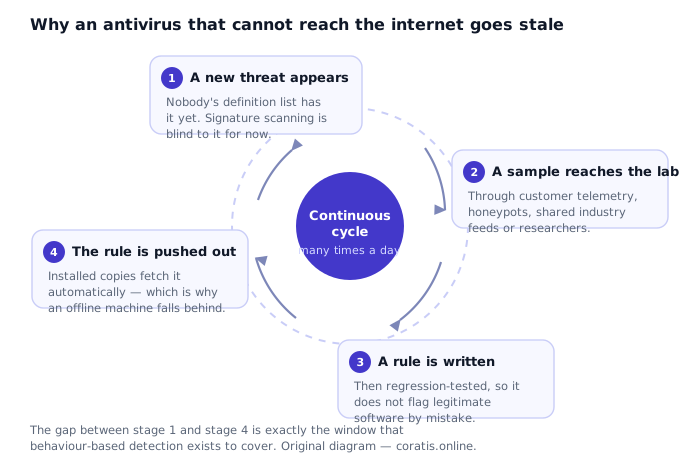
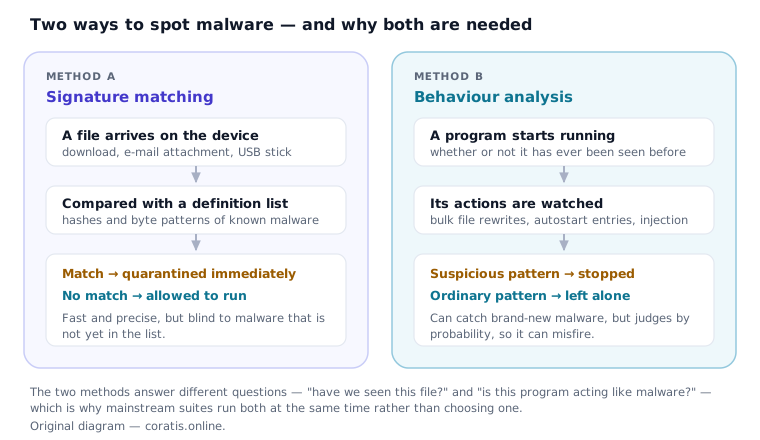
A signature is a fingerprint of something already known to be malicious: a cryptographic hash of an exact file, or a byte pattern characteristic of a malware family. Matching is quick and unambiguous. It also cannot, by construction, recognise anything that is not already in the list — and the list has to be updated continuously to stay useful.
3. Heuristics and behaviour monitoring
Because signatures are always behind, products also watch what programs do. Rapidly rewriting hundreds of documents, injecting code into another process, adding an autostart entry, disabling a system recovery feature — individually these are things legitimate software sometimes does, but in combination they form a pattern.
This is a probabilistic judgement, so it produces two kinds of error: a false negative (real malware judged ordinary) and a false positive (legitimate software interrupted). Testing laboratories score false positives separately for exactly this reason — a product that blocks everything would have a perfect protection score and be unusable.
4. Cloud reputation
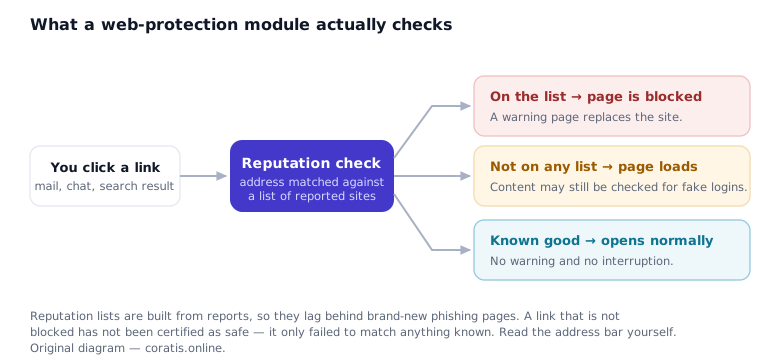
Rather than shipping every signature to every machine, products increasingly ask a vendor service about a file or an address in real time. This makes the response to a new threat much faster — minutes rather than the next definition push — and keeps the local database smaller.
It also means the product is sending queries to the vendor while it works, which has a privacy dimension worth being aware of: what is transmitted, and what the vendor retains, is described in that vendor's own privacy documentation. That is a question to ask of the software you install, not of this website, which transmits nothing.
How the four fit together
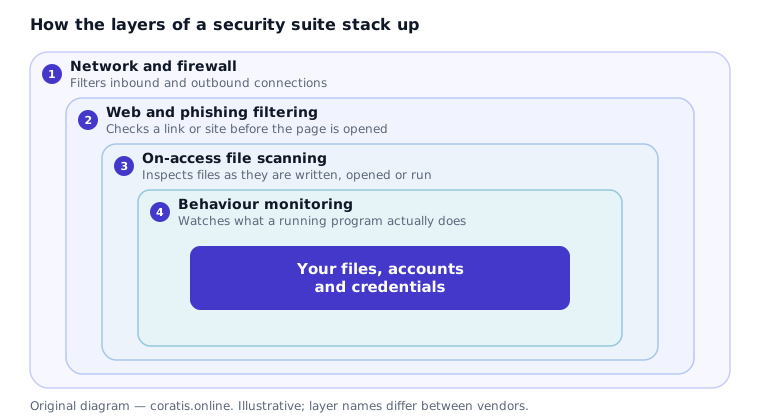
Layered defence is not a slogan; it is an admission that each individual mechanism has a known failure mode, arranged so that the failures do not overlap. Signatures miss what is new; behaviour monitoring covers that gap but misjudges sometimes. Cloud reputation shortens the delay; the firewall and web filter try to stop the thing arriving at all.
The limits, stated plainly
- No product detects everything. Laboratory protection scores are high, not perfect, and they describe a test window rather than a guarantee.
- Nothing in a security suite reverses completed ransomware encryption. Only a backup kept out of reach does.
- Software cannot prevent you from being persuaded to act against your own interest. Social engineering bypasses the whole stack.
- An antivirus product is not a substitute for installing operating-system updates, using unique passwords, or enabling two-factor authentication.
Written by Oliver Young for DELTA BARS s.r.o., published 25 September 2026. General information, not professional advice. All diagrams on this page are original SVG files created by us.